| |
Advantages of Using a Freeway versus Embedded ICP boards
Note: As of 2020, Protogate now only supports using the
Freeway
communications server to access WAN links,
rather than the old method using embedded
ICP
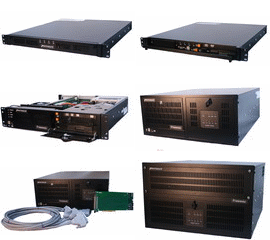
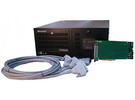
boards. A Freeway server (with ICP boards installed into it)
offers a number of benefits described below:
- Minimizes Impact on Client Machine
The Freeway requires only a simple socket interface to your
client machine -- it just needs to be connected to the same
IP network.
On the other hand, installing embedded ICP boards requires
opening the case of your client machine, installing ICP boards
into PCIbus slots, installing an ICP driver, etc.
The Freeway's lack of impact on your client machine leads to
fewer cross-process bugs, easier client software debugging, and
easier client machine hardware/software upgrades in the future.
|
|
Call us at (U.S.):
(858) 451-0865
|
|
- Simpler, More Capable Interface
The Freeway offers a more flexible and capable client
application-level interface than the Embedded solution.
The Freeway can be accessed with the
DLI (Data Link Interface),
as opposed to the Embedded solution which offers only the
DLITE interface. DLITE does not support
Normal Mode,
and has support for fewer operating systems than the
Freeway DLI client interface.
- Larger WAN link capacity
A Freeway can hold more ICPs than may fit, or be comfortably
handled, on a client system's PCI bus. The
Freeway 3414
can hold up to eleven (11) ICP2432
cards, for a total of 88 EIA-232 ports, or a total of
44 EIA-449 / EIA-530 / V.35 ports.
- Automatic Downloading of Protocol Code
With the Freeway, the ICPs can be automatically downloaded
from the Freeway hard disk drive, flash drive, or network,
upon power-up or manual reset (whereas downloading
embedded ICPs always requires a client program to be run).
- Multiple Simultaneous Clients
The user is not limited to a single client system when
running protocols with the Freeway.
Any client on the network can access the WAN links on a
Freeway, without redistribution or reconfiguration of
hardware resources.
Also, multiple client systems can use a single Freeway ICP
at the same time, whereas an embedded ICP board is limited
to use by one system at a time, since it is physically
available only to that system's PCI bus.
- Simpler Recovery from Hardware Failure
The Freeway allows swift recovery of protocol operations by
a standby client system when the primary system suddenly
becomes unavailable, without reconfiguration of ICPs or
swapping of cables.
- Standardized Driver
The Freeway comes with Protogate's fully-supported Freeway
ICP driver. Protogate does provide embedded ICP drivers for
many common client operating systems; however, these drivers
are under the constant threat of becoming obsolete as
vendors introduce new versions of their operating systems.
- Additional Internal Freeway Capabilities
The Freeway server offers internal capabilities that are not
possible with an embedded ICP board. These include:
- The ability to offload special processing of protocol
messages to Server-Resident Applications
(SRAs).
- The facilities of the Freeway's
Message Switch
for flexibly routing data streams between ICP WAN ports
and UDP or TCP datastreams (including multicast) --
saving the user the trouble of programming such support
in a client system, and avoiding the extra CPU load and
PCI bus traffic load that this would impose.
- Additional debugging and diagnostic capabilities, such as
the ability to view status or error messages output by
any ICP board CPU
(icpprint),
and the ability to extract
a complete dump of the RAM on any ICP board
(icpdump).
- Fully-Autonomous Operation
Because of the SRA and Message Switch capabilities, it is
sometimes possible to offload all client activity to
the Freeway -- while still allowing for client monitoring
of status and statistics, if desired. The Freeway can
be connected to an IP network, or even the public Internet,
and perform its functions without depending on any particular
client system to be up and available.
- WAN (ICP) Development Environment
The Freeway includes a complete WAN protocol development
environment (editors, C compiler, assembler, linker,
debugger, etc.) already installed and ready to use to
write programs to run on the ICP boards.
This makes it easy to develop your own protocols -- or
to make slight modifications to existing protocols.
For a more detailed description of the methods of accessing
WAN links using a Freeway and ICP boards,
read Protogate's
Description of how to access WAN data streams, or
contact us
to find out how we can put our products and our expertise to work
for you.
Back to the top-level Protogate webpage
|
|